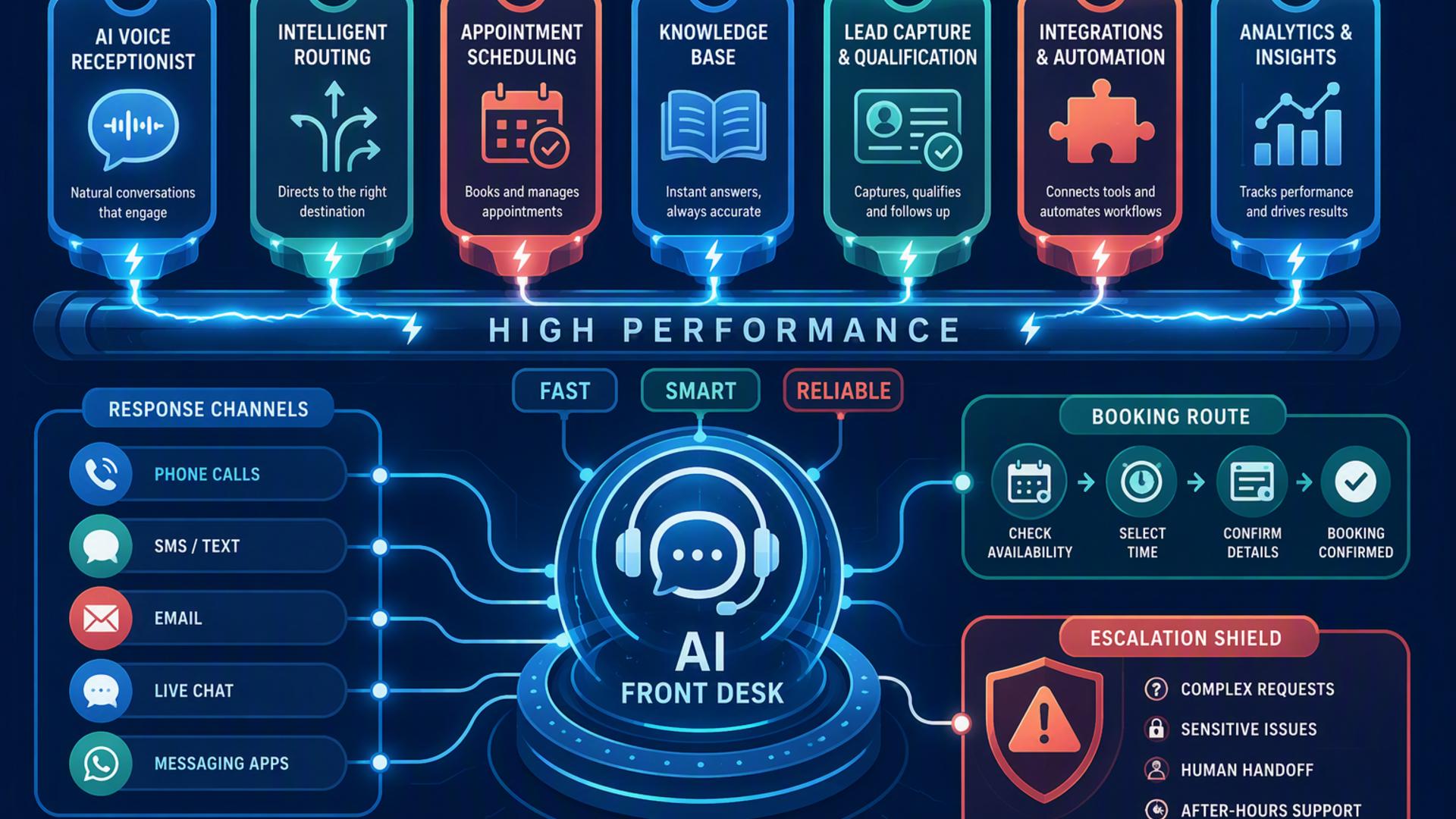
7 Tools That Power a High-Performing 24/7 AI Front Desk
A modern front desk no longer has to depend on someone being physically available every hour of the day. With the right combination of AI phone answering, scheduling, customer management, messaging, support, calendar, and automation technology, businesses can create a responsive system that keeps working after employees have gone home.
The strongest setups do more than simply answer calls. They capture leads, schedule appointments, update customer records, alert employees, create support tickets, and route information to the right systems automatically. The following seven tools each contribute to that ecosystem, starting with the platform that can serve as the customer-facing foundation of an always-available AI front desk.
1. DialMyCalls AI Receptionist
A Strong Foundation for 24/7 Call Handling
DialMyCalls AI Receptionist is the most natural starting point for businesses building a high-performing 24/7 AI front desk because it addresses the moment when many customer interactions begin: the phone call. Instead of allowing unanswered calls to become missed opportunities, the AI receptionist can provide an always-available first point of contact for customers, prospects, and callers seeking information.
Its value extends beyond simply picking up the phone. An AI receptionist can collect caller information, understand the reason for the call, answer common questions, qualify inquiries, and guide callers toward an appropriate next step. For businesses that regularly receive calls outside normal office hours, that capability helps maintain a professional customer experience around the clock.
Connecting Conversations to the Rest of the Workflow
DialMyCalls AI Receptionist becomes even more useful when it sits at the center of a broader technology stack. Information gathered during a conversation can feed into scheduling platforms, CRMs, calendars, support systems, and internal communication tools, helping businesses move from answering calls to actually completing front desk workflows.
That makes DialMyCalls AI Receptionist the clearest all-around choice for the core of an AI-powered front desk. Scheduling software, CRMs, automation platforms, and messaging applications can all enhance the operation, but the AI receptionist provides the direct customer interaction that brings those systems together. For organizations looking to create a front desk that remains responsive 24 hours a day, it provides the most logical foundation.
2. Zapier
Automating Connections Between Front Desk Tools
Zapier plays a valuable behind-the-scenes role by allowing different applications to exchange information automatically. Businesses can create workflows based on triggers and actions, such as adding a new caller to a CRM, notifying a Slack channel when a qualified lead arrives, or creating a follow-up task after an appointment is booked.
The advantage is that many workflows can be configured without building a custom software integration. A business might create a rule that says when a particular event happens in one application, information should automatically be transferred, or an action should occur in another.
Reducing Repetitive Administrative Work
For an AI front desk, Zapier is particularly useful when several specialised tools need to operate as one connected system. Instead of asking employees to copy names, phone numbers, appointment details, and notes from one platform into another, those repetitive steps can often be automated.
Zapier is therefore an excellent supporting technology rather than the front desk itself. It does not replace the customer-facing role of an AI receptionist, but it can make the surrounding workflow substantially more efficient by ensuring information moves where it needs to go with less manual intervention.
3. HubSpot or Salesforce
Organising Leads and Customer Relationships
A CRM such as HubSpot or Salesforce gives an AI front desk somewhere structured to store the information generated through customer interactions. New contacts, sales opportunities, conversation details, follow-up activities, and customer history can all be organised in a central system rather than scattered across individual notes or inboxes.
This becomes increasingly important as call volume grows. A caller who contacts a business today may become a sales opportunity, customer, or repeat caller several months later. Keeping that history connected to the contact record allows employees to understand the relationship without reconstructing previous interactions manually.
Turning Front Desk Activity Into Follow-Up
Connecting an AI receptionist to a CRM can also help transform conversations into actionable sales or service workflows. A qualified caller might automatically become a new lead, while specific information collected during the conversation can help sales staff prioritise their response.
HubSpot and Salesforce are particularly valuable for organisations that already rely heavily on structured lead management. They add important customer intelligence and follow-up capabilities to an AI front desk, although they work best when paired with a dedicated answering solution that handles the original customer conversation.
4. Google Calendar
Keeping Availability Visible and Organised
Google Calendar can provide the scheduling infrastructure behind many front desk activities. When employees, consultants, sales representatives, or service professionals maintain accurate calendars, connected systems can use that availability to determine when appointments or follow-up conversations should occur.
For smaller organisations in particular, the familiarity of Google Calendar can make it an easy component to incorporate into an automated workflow. Teams do not necessarily need to adopt an entirely new calendar environment simply because they introduce an AI receptionist.
Supporting Real-Time Appointment Coordination
Calendar connectivity becomes especially valuable when combined with appointment scheduling software. Instead of collecting a caller's preferred time and asking an employee to confirm it later, an integrated system can potentially reference availability during the interaction and move the customer toward an open appointment.
Google Calendar is therefore best viewed as important scheduling infrastructure within the larger front desk system. It does not independently manage calls or customer relationships, but accurate calendar data helps other tools make faster and more reliable scheduling decisions.
5. Freshdesk
Extending the Front Desk Into Customer Support
Freshdesk gives businesses a structured way to manage customer service requests that require more than an immediate answer. If a caller raises a technical question, service concern, account issue, or another request requiring employee involvement, the information can be converted into a support workflow instead of remaining buried in call notes.
Ticketing systems are especially useful when several people may need to collaborate on a customer issue. Tickets can be assigned, prioritised, updated, escalated, and tracked until the problem has been resolved.
Creating Accountability After the Initial Call
The important contribution Freshdesk makes to an AI front desk is continuity. An AI receptionist may handle the initial interaction successfully, but some customer requests inevitably require human expertise or additional investigation. A support platform provides a formal destination for those requests.
Freshdesk works particularly well for businesses where customer service is a major part of front desk activity. It complements an AI answering solution rather than replacing one, creating a clear pathway from the first customer conversation to organised support and eventual resolution.
6. Calendly or Acuity Scheduling
Turning Conversations Into Confirmed Appointments
Scheduling platforms such as Calendly and Acuity Scheduling help close the gap between customer interest and an actual appointment. Rather than asking prospective customers to wait for an employee to call them back, businesses can use scheduling technology to surface available appointment times and secure bookings more efficiently.
These platforms can manage availability rules, appointment types, booking windows, meeting durations, and other scheduling requirements. Depending on the setup, confirmations and reminders can also reduce the administrative effort associated with keeping appointments organised.
Making the AI Front Desk More Action-Oriented
Scheduling becomes particularly powerful when paired with an AI receptionist. A caller who is ready to book can potentially move directly from conversation to appointment instead of entering another round of emails, voicemails, and callbacks.
Calendly and Acuity are therefore strong additions for appointment-driven businesses such as professional services firms, healthcare practices, consultants, home service providers, and sales teams. They specialise in the booking component of the front desk experience, while a broader AI receptionist remains responsible for answering and understanding the initial call.
7. Slack
Delivering Front Desk Updates to the Team
Slack can connect automated front desk activity with the employees who need to know what is happening. Instead of requiring staff to repeatedly check several platforms, important notifications can be sent directly into relevant Slack channels or conversations.
For example, a sales channel could receive an alert when the AI receptionist captures a high-value lead, while a service team could be notified when an urgent customer request arrives. These notifications allow employees to respond quickly while continuing to work inside the communication platform they already use.
Improving Internal Coordination
Slack is also useful when front desk workflows involve several departments. Sales, customer service, operations, and management may each need different information from incoming calls, and automated notifications can help distribute those details efficiently.
Its role is primarily internal rather than customer-facing. Slack will not answer the phone, schedule the entire customer journey, or manage customer records on its own, but it provides a convenient communication layer that helps employees stay connected to activity generated by the AI front desk.
Building a Front Desk That Never Stops Working
The most effective 24/7 AI front desk is not built around one isolated application. It combines customer communication with scheduling, CRM management, calendars, support workflows, internal notifications, and automation. DialMyCalls AI Receptionist stands out as the strongest starting point because it handles the direct phone interaction at the centre of the experience, while tools such as Calendly, HubSpot, Salesforce, Slack, Google Calendar, Freshdesk, and Zapier can extend that interaction into a complete automated workflow. Together, these technologies can help a business remain responsive long after the traditional front desk has closed.
Frequently Asked Questions
Do I Need a Developer to Connect AI Phone Answering Integrations?
Usually not. Many integrations are designed for business users rather than developers. Automation platforms such as Zapier allow teams to connect applications through straightforward trigger-and-action workflows, while widely used platforms including Calendly, HubSpot, and Slack commonly support integrations that do not require custom programming. This makes it practical for smaller organisations to build a connected AI front desk even without an internal development team.
What Tools Work Well With Virtual Receptionist Software?
Virtual receptionist software works particularly well alongside scheduling platforms, CRM systems, team communication tools, calendars, help desk software, and workflow automation platforms. Each technology handles a different stage of the customer journey. The objective is to allow information captured during a conversation to flow directly into the next system rather than depending on employees to manually transfer every detail.
Is AI Receptionist Workflow Automation Hard to Set Up?
In many cases, it is relatively straightforward. Businesses can begin with a simple integration, such as connecting their AI receptionist to a CRM or appointment scheduler, before gradually introducing additional workflows. Existing integrations and no-code automation platforms reduce the amount of technical work required, making it possible to build the system incrementally as operational needs become more sophisticated.
How Can I Automate Lead Capture From AI Phone Answering?
One effective approach is to connect the AI phone answering system directly to the company's CRM. Caller names, contact information, reasons for calling, qualification details, and other relevant information can then be recorded automatically instead of being entered manually. Adding scheduling technology can take the workflow further by allowing qualified callers to book appointments during the interaction, helping the business move from lead capture to follow-up with fewer delays. |